Wednesday, April 16, 2014

Writing Stories on the iPads


Want a fun and motivating way to get your students writing and sharing their books? Apps are the way to go!


Click here to find 10 Good iPad Book Apps


My favorite book apps are

Book Creator - Really versatile, lots of options, makes really nice looking books but I wouldn't start my second graders with this app. It's a lot going on.  I would get them started with Scribble Press and then move to Book Creator.

Story Buddy2 - Love this app for math stories. Records your voice, great for small group collaborations.

and Scribble Press - Good starter app, easy to use, easy to share and great way to make class books. Downside- all the books are in a line and students accidentally click on the wrong book. They updated the app so now you have to click on a choice after to click the book so that helps keep them out of other student's writing.

They are all kid friendly and can be shared online and in ibooks. I just downloaded Book Maker for Kids and love that it syncs with my other iPads. It also allows you to put in the students' names as the authors so all their books are listed under their name.  No more book mix ups! I have a feeling this may quickly become my new favorite!
Book Maker for Kids
$3.99 


Good luck with your stories!

Mrs. Barcavage

Thursday, March 27, 2014

Mystery Skype

Talk about an amazing way to connect with the world! We just finished our first Mystery Skype call with a 3rd grade classroom in a small school in Iowa. My students were thrilled to see another class of students and work together to discover where they live. After we figured out our secret locations using maps and yes/no questions, we shared information about our school, town and other fun facts about our class. We can't wait for our next call!


Click here to get started with MysterySkype!

Mrs. Barcavage

Augmented Reality

What is that? It's a way of making ink and paper come to life on your phone or device complete with sound, motion and interaction. Talk about getting kids excited to write!  I use the app colARMix on my iPad to show students how their coloring page can jump off the page and interact with them. Click here to print your pages: colarmix.com


Tuesday, March 18, 2014

Seuss-tastic Author Study


We had a fantastic time learning about Dr. Seuss and reading his books for our author study! Check out what we learned!


Leprechaun Traps


Our class had a great time building, writing about and setting up their Leprechaun traps.  Every year my students come up with more clever ideas for how to trap that sneaky leprechaun.  He outsmarted us again this year but one of these years we might just catch him.  We always enjoy the treats he leaves behind including the Lucky Charms cereal that we use for graphing in math.

Embedded image permalink

Happy Saint Patrick's Day!

Wednesday, November 27, 2013

Global Communities


I am so excited to get started with global communities online.  We are going to be collaborating with classrooms overseas to solve a common global problem using ePals Global Community .  This all goes along with flattening classrooms and connecting globally.  Giving young students the opportunity to collaborate with other countries helps them to learn to be respectful and ethical.  The primary years are a perfect time to influence their bias and prejudices while they are still developing.  This helps them understand that they are not the center of the universe and that there are other perspectives, priorities and ways of life in the world. As the world continues to shrink, the need for us to have respectful and ethical minds grows.  We need to foster this learning our students so they are prepared to work and live in a global world.


Friday, April 12, 2013

Friday Letters on Kidblog!

    Since the typical response to the question, "What did you do in school today?' is 'Nothing', I decided to start having the students write Friday letters to their parents on Kidblog.  Every Friday they write a letter to tell their parents all about what they did in school during the week.  The parents can then log in and write a letter back in the comments section.  On Monday we display the letters on the Smartboard and the students read them to the class.  This has been a great way to involve the parents in our school and keep them informed.  The students are motivated to do their best since it's their parents they're writing to and they love reading the letters their parents post.  I even had a student who got letters from her mom, dad and sister.  She was very proud to share them.

Here is the sample I made up so the students and parents could see what to do.


Teacher Tip- Kidblog.org is free and was designed for young students.  It is secure. No one can read the posts unless they are signed in with their specific password.  You can opt to approve the comments and posts before they are displayed for everyone to see and all of the comments and posts are tracked with the IP Address so you know what computer it came from.  The Friday Letter can also be done in a paper journal and sent back and forth if the technology is not available.

Thursday, April 11, 2013

The Value of Equality

One of my favorite parts of teaching is those unexpected teachable moments.  We have been learning about nonfiction text features and practicing using them while we read.  So with it being baseball season I thought a biography on Jackie Robinson would be a great read a loud.  As I'm reading the students start buzzing with connections.  I always cover Dr. Martin Luther King, Jr. in February and we take time throughout the year to focus on the contributions of an array of people in our country.  So the students really had a lot to pull from.  For them it's almost like a fairy tale when I show them pictures of separate entrances, water fountains, schools, etc.  Second graders have strong opinions about fairness and these images don't meet their standards.  I am moved to hear their thoughts about how we should treat each other and what our world should be like.  They give me hope in a world that, even today, is far from fair and equal.  I closed the book and we took a few minutes to discuss generally some examples of things that are still not equal even if the law says they should be.  We also talked about their experiences and what it feels like to be treated unfairly.  I could see my students building on their relationships with their peers and gaining an appreciation for their differences and similarities.  It always amazes me when I see the amount of acceptance and consideration children can have for one another.  I took a moment to help them feel empowered and understand that they can help make our world better, even right now, in any little way, it matters.  We ended the discussion with the simple rule, treat others the way you want to be treated.

Wednesday, April 3, 2013

iPad Management Tips

  Managing iPads in a 2nd grade classroom can be overwhelming at first.  Here are some ideas to keep it simple and get the most use out the iPads everyday.

1.       Assign Students to One iPad
This way you can track their use easier and create usernames in various apps for them. I have six student iPads and each one is labeled with a number on the screen. Since there are 18 students in my class, I have 3 students using each iPad.

2.       Create Groups and Assign Cycle Days
We operate on a six day cycle so I created three groups and assigned them each 2 cycle days for iPad use during the 90 minute literature block.

3.       Create Folders for Apps
We use The Daily Five so I created a folder for each 'five' and organize apps according to the reading, writing or spelling skill it addresses.  This makes it  easier for students to find the apps they need.

4.       Create an iPad Map
I built a giant iPad out of bulletin board paper to give students a map of where to look for the apps and what apps we have learned to use.

5.       Display Assignments
Create a guide for each group's reading assignments.  I usually assign three and one of the three might be an ongoing project or writing assignment.  The students can save their work and continue to add to it on their cycle day until it is ready to turn in or by the deadline I assign.

6.       Storage
You will need a common place in the classroom where the iPads will be stored and charged.  This could be as simple as a dish drying rack set on a table or desk above a power strip.


I will add more tips and images.  Let me know if you have questions or other ideas!

-Mrs. Barcavage


Thursday, March 7, 2013

Caramel Apple Cinquain Poems

This was a fun activity I did in the fall with my second graders to teach cinquain poems.  The students used the process of making caramel apples to come up with verbs and then they looked at the caramel apple after they made it to think of adjectives for their poems.  They both turned out great!

Here's how to make to happen:

Gather:

Crockpot
2 Large Cookie Sheets (check the cafeteria)
wax paper
sturdy popsical sticks

Ask for or Buy:

1 apple for each student
1lb of caramel candy (bulk section)
sprinkles
chocolate chips
peanuts (if no allergies)
cocoa crispy cereal
Any other topping that you could roll the apples in
2 or 3 Parent/Family Volunteers

In the morning of the day you are going to make the apples have students take turns sorting out ten caramels each and unwrap them.  Put the caramel in the crockpot and turn on high.  The caramel will be ready if a few hours.  Swirl the apple in the caramel then let them set for 5-10 minutes.  Have students roll them in the topping of their choice.  You can wrap them up and send them home or take a picture and let the kids eat them once they are done writing adjectives to describe how they look.

Have fun!

Summative and Formative Assessments

   As formative assessments grow in popularity, rubrics are becoming a necessity in best practice instruction.  Rubrics are an excellent way to give students information about what your expectations are ahead of time so they can meet the bar.  Grading and checking for understanding is simple and consistent. But making rubrics can be cumbersome especially when your teaching every subject. 

   Thanks to iRubric creating rubrics doesn't have to be such a chore.  This free online tool makes creating rubrics quick and easy.  Plus you can share your rubrics and use others.  www.rcampus.com/indexrubric.cfm

   There are two basic kinds of rubrics.  One is made for the teacher to assess the students and one is used by the students to self assess their performance and understanding.  You can make them as simple or as complex as you need.  One that I made up for my students is simply smiley, straight and frown faces that the students color in according to their performance in class.  I use kid friendly language to help students assess themselves.  It often helps to give examples of three levels of student work to help them compare their work and make improvements.  You can use rubrics for formative assessments throughout instruction and as a summative assessment for tests, projects or presentations.


Friday, February 22, 2013

iPads... How Did we Learn without You?!

             
        So much to share, so little time!  Technology has it's pluses and minuses it's true, but when used appropriately it can take education to a whole new level.  Lets start with writing.  Projects that use to take a week or more and countless photocopies now can be done in a few days or hours.  Writing activities don't need 3 sets of papers to complete.  We organize our thoughts, blog on Kidblog.org, edit on the same blog, peer review with comments, edit and grade the final copy all within the same blog.  Even better it is instant!  Our world moves so fast, we need our students to get in that pace to be competitive and they need to be tech savvy.   Students can peer review with the Smartboard and the student being reviewed can edit on the spot!  No more endless copies of writing and lost or crumpled papers.  Plus, they can all read each other's writing and make comments for what they did well and what they could do to make it even better according to the six traits of writing.  This gives students the opportunity to apply what they've learned about quality writing and it gives them ownership of their learning.  What's more for us teachers is that we have all the students writing at our fingertips where ever we go.  No more lugging around files of papers to grade.
Kidblog
        Remember the days of making class books?  You start with a rough draft, then edit, rewrite the final copy, then illustrate, then laminate, cut, bind and publish two weeks later if you're lucky enough to get a parent volunteer.  Well, now students can write a rough draft, edit, illustrate and publish all within the same app and they publish to iBooks (virtual bookshelf) where everyone in class can read it.  Usually, they are done within a few sittings.  The best part is the book will never get ripped, bent or lost and they can go back and edit as much as they would like even months later.  We can read it in shared reading on the Smartboard or read it during read to someone on the iPad.  I can e-mail a copy to the parents to share and show off to Grandparents, Aunts and Uncles over seas or across the country.


        What about those class reports and projects that take up so much space and fall apart on the way to school?  You have two choices.  One, still have them do it the "old fashion" way but once it arrives at school take a photo on the iPad.  Then students can take their projects back home.  You use the photo to make a class book in ScribblePress where the students can write about their presentation and once published they can go through everyone's reports.  Or use ShowMe and have the students record their voice as they give their presentations. Suddenly you have a book or video of your class' presentations that can be shared with everyone and revisited over and over.  Send it to a lower grade level to teach them about the topic or use it the next school year to give students and parents an idea of what you are looking for in their projects.  Now parents have a great archive to save forever from second grade and it doesn't take up any space at home.  Choice two, have students make their project with an App or Web 2.0 presentation or video such as Animoto or Prezi.  Their projects will be engaging and can include their voice, writing, illustrations or diagrams, web links, quizzes and more.  Once they finish their project they can upload it to their folder in Dropbox where you can grade it.

       One of my favorite apps for writing is PhotoCard.  Students learn to write a friendly letter on their own customized postcard.  They can take a photo of a something they are working on in class or of themselves and then write a letter on the back.  Then they add a stamp, some stickers and address it to their parents' email.  It gets sent to you and the parents so they can see what their child is doing and you can grade their writing.  PhotoCard was one of the first apps I introduced this year and the students picked it up immediately.  When they are done with the card they can take a screenshot and upload it to Dropbox so you can grade it there.
Scribble Press
Scribble Press Published in iBooks


PhotoCard
Dropbox
StoryPatch

Monday, April 30, 2012

Gorgeous Glasses Day!

So, this year in my class, I have several students who have recently had to get glasses.  They are not all thrilled about it despite the fact that their glasses look awesome!  So I thought lets have gorgeous glasses day when the whole class can celebrate these students by wearing fake glasses.  Then the next day only the 'cool' kids can keep wearing their gorgeous glasses.  When I announced that Monday would be gorgeous glasses day my students with glasses were thrilled because they already had glasses.  The rest of the class had to figure out where to get some or how to make some.  It ended up working out well.  Some of the kids took the lenses out of an old pair of sunglasses while others had some dress up pretend glasses. 

We had so much fun showing off our glasses and celebrating the students with glasses in our class.  Plus, it was good for all of us to see what it is like for these students to wear glasses all day.  I hope it helped create empathy and exceptance among my students.  And I think that my students with glasses are more confident and comfortable now. 

Mrs. Barcavage

Friday, April 27, 2012

ONLINE FILE STORAGE

If you are like me and have a rediculous number of documents, pictures, powerpoints, graphic organizers, etc. you need this online tool.  LIVE.BINDERS   It is free to use and allows you to organize all your documents into binders online.  You also have the choice to share your binders with anyone or people you specify and you can access other teachers' binders.  All this for FREE! 


The only downside I have found is that you cannot upload files.  You have to upload one doc. at a time and make it a TAB or Subtab.  It uploads each doc pretty quickly once you get going and you can make multiple binders and bookshelves.  This is a perfect solution for backing up files and even saving links to websites.  Everything you use for a given unit is stored in one place.  I might be able to go paperless and clean out my cabinets and drawers this summer!


Enjoy! 


Mrs. Barcavage

Thursday, April 19, 2012

A Bug and A Wish...Conflict/Resolution is Elementary

So a bug and a wish is a template I use to help students open a dialog and express their feelings.  My students generally use them when they come in from recess.  They complete the sentence, It bugs me when... and I wish you would...  This is a great way to get students talking and writing about what is bothering them and helps them to think of a solution.  It also makes the other student aware of how their actions affect others.  For younger students you can use puppets to do the talking and peace table to sit together. 

Class Dojo The New Way to Manage Your Classroom Behavior

Overview of Class Dojo
Thanks to a tech saavy coworker I now have the best classroom management tool working for me on my smartboard.  Class Dojo is an online classroom management tool that allows you to track your students' behavior and earn them points towards rewards and prizes.  When you set up your class, or classes, each student is given a monster character beside their name.  You can display your whole class on the board at once and add or take away points as you teach.  The program is customizable to your class rules or specific student goals. 

Sound and Display Options
When they earn a point you have the option to have a banner display and a ding sound go off so students can see who earned it and what they earned it for.  I prefer to leave it off during independent work so they are not distracted by it but it is wonderful for whole group lessons because it really gets the students motivated to volunteer.  I also leave the sound and banner off for negative awards simply due the fact that this year many of my students would feed off that negative attention. 

Remote Access
Another great feature with this program is that you can use your smartphone or tablet as a remote control to award points while you are working in a small group, walking your class in line or even on a field trip.

Data
Probably one of the best and most helpful features is that this program tracks and saves student behavior over time.  At the end of each day, week or month, whatever you need to view, it graphs the students positive and negative behaviors.  There is room at the bottom of each day's report for you to add comments. You can print, email and save this data for Parent Teacher Conferences, IEP and 504 plan meetings.  The program will let you specify specific dates to display and as far as I know you will never lose your data until you delete the class.

Parent/Teacher Communication
This makes daily and weekly communication easy and effortless.  My students with specific goals get their reports e-mailed daily to their parents and the support team that works with them.  All my other students have their reports sent home weekly on Friday.  You can set it up anyway you would like.  There is an address book so you do not have to enter the e-mail everytime.  All you have to do is choose the students you want and hit send report.  There is a very professional message along with the e-mail and a link to view their child's report online.  If parents have questions they can reply to the e-mail and it will come to the e-mail you used to create your account.

Rewards and Incentives 
At this point there is only one reward online and that is to change the monster or critter that is beside the student's name.  My students do like this and there are many monsters to choose from.  In addition, I created a Class Dojo reward chart with many different prizes and the number of points they need to earn them.  I also hand out award certificates every Friday to recognize students for the positive behaviors I look for.  Other teachers I know who are using this let the points accumulate over 2 weeks or even a month.  I prefer to start fresh every Monday.  When I clear the points on Monday the data is saved so you can look back on previous weeks as needed.

I highly recommend this tool.  It is free to sign up and use.  You can have muliple classes created and it is a breeze to keep parents informed.  Enjoy!  http://teach.classdojo.com/

Mrs. Barcavage

PS- If someone would share with me how to attach files to my blog, I will post my certificate templates and class dojo rewards chart. 

Thursday, April 12, 2012

Spring Brings Insects to our Classroom


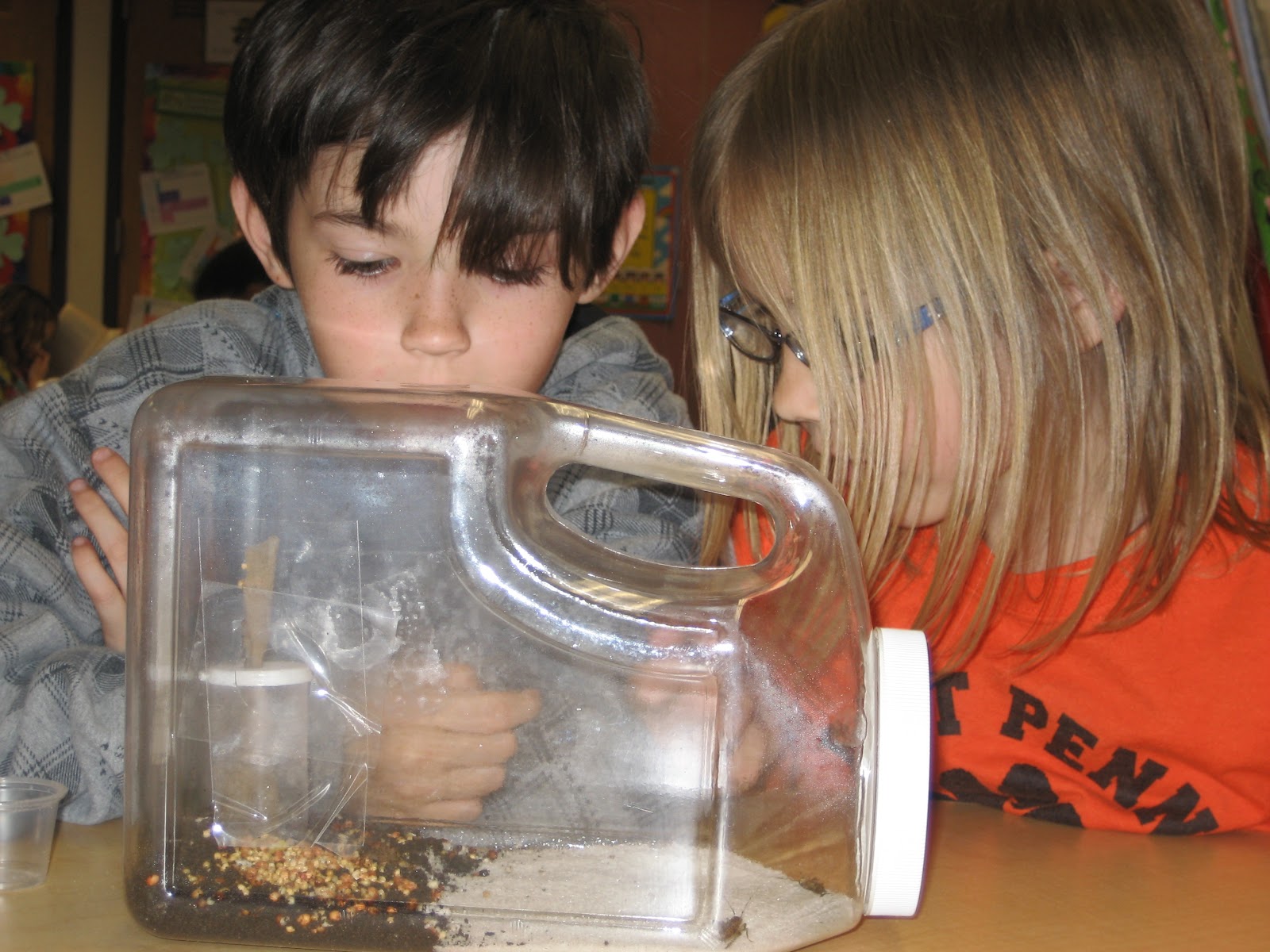
So it's spring, I think, yesterday we had sleet and snow in PA.  I can't seem to put away my winter clothes but it's April so in our classroom it is spring.  There are lots of exciting lessons and activities happening.  The biggest change in our room is that we have insects moving in; and no, we do not need an exterminator, they are here on purpose!  I am not an insect lover by any means.  At the trainings to teach about insects I was the one jumping away from the table and shrieking when they moved.  I am getting better and I'm lucky that a lot of second graders don't mind getting up close and personal with insects.  They really enjoy having living things in our classroom and it really does a lot for their motivation.  So we start out with mealworms and have the students tell us what insects need to live and grow.  Then they build a habitat for them in a vial and observe their life cycle.  I was surprised to see what these turn into.  The next insect to arrive are ants in an ant farm and we learn about their different body parts and roles in the colony.  After that, we get crickets and build a terrarium out of recycled materials for them to live in.  This is really cool for the students because the crickets are very active and there are other living things like grass growing in the habitat.  This year we will be building our terrariums on Earth Day!  Our final insect is no surprise it's the caterpillar and we watch them turn into painted lady butterflies and then release them into our butterfly garden outside.  The students record all their observations in their science journal and by the end they understand the life cycle of an insect.
  In addition, to insects in our science center we also tie in insects to our language arts curriculum and character building lessons.  One of my favorite mini units to teach is on bullying using Hey, Little Ant.  This is a cute song and story to teach about caring for all living creatures and to help students identify their own bias towards each other.  We start by watching the performance of the song by Phil and Hannah Hoose then we act out the roles ourselves and discuss the similarities and differences between the boy and the ant using a Venn Diagram.  I have several writing activities for the students to participate in to get them thinking.  First, I have them answer the question, should the boy squish the ant and why.  They have to give me three good reasons for their answer using transitions words and complete sentences.  Then, I have them draw a creature that has no feelings and write how they know it cannot feel.  This leads to some great discussions on stereotyping and assumptions.  Finally, we end the unit by tying in bullying and standing up for each other and ourselves by expressing our feelings in a constructive way like the ant did.  I teach my students to use a form called a bug and a wish.  It's a simple template that says 'It bugs me when...' 'I wish you would...' and allows students to open a dialog to solve their problems.
  In guided reading, I have several nonfiction books on insects that the students can read and practice using text features and note taking.  In readers theater, we perform the Little Pollinators which teaches about how insects pollinate a garden.  A great video to go along with this theme is Reading Rainbow's Insects.  The students get a chance to see a stick bug, a leaf bug and a African Hissing Cockroach.  Magic School Bus also has some good books on insects for shared reading.  
  Students can learn more about insects on these kid friendly sites: 
Happy Spring!                                                                                                           
 -Mrs. Barcavage

Sunday, April 1, 2012

Reader's Theater and Poetry Breaks


   Fluency is an important skill in reading and we practice this often in second grade.  I introduce reader's theater and poetry breaks early in the year and the students get really excited about them.  The reader's theater scripts I use have lines appropriate for many different reading levels.  The narrator usually has more difficult vocabulary and much longer parts, while some side characters may only have 3 lines to read.  We begin by reading the script together as a class.  That way the students can get a feel for what the story is about and who the characters are.  Then they go back to their seats and try reading the script themsevles.  I ask them to choose 2 or 3 characters they would like to play.  When they come back to the circle carpet I assign the parts.  Most of the plays I use have around 7 parts so I end up with 3 groups.  We practice the play during Read to Someone and Read to Self each day.  Then I have them practice in groups with their same parts so they can discuss how their character would act, use expression, etc.  After that they meet with their group and read through the whole play many times.  Finally, we have a few rehearsels in front of our class.  I usually mark the floor with tape so the students know where to stand and we use the smartboard for our background scenes.  A Powerpoint slide show seems to work best.  When they feel ready we make invitations in writers workshop and deliver them to other second grade classes or to our parents.  The students perform in costume for their audience.  Even my shy students come out of their shells the more we perform these plays and my high readers who zoom through the pages learn to slow down and use expression so the audience can follow along.  There are so many readers theaters to choose from we keep them going all year long.  I sometimes try to tie in my Author's Spotlight author with the scripts I choose.  I also use scripts that go along with our science and social studies content.  I great extension with this activitiy is to have your higher students write their own scripts based on their favorite books.  Once you have performed the script you can store it in a puppet center so the students can continue practicing fluency with a puppet show.

   Poetry Breaks are when we gather on the carpet and read poems together.  Usually after literature centers my students will come to the carpet and I will hand out a poem for us to read together.  Sometimes we just practice reading them fluently while seated and other times we act out the poems giving students a chance to move and stretch.  After our poetry break we are transitioned and ready to begin math.